Cancel your subscription: how it works
Last updated 20 November 2026
rednea has no minimum term and no annual contract. If you want to cancel, it takes a few steps, in the dashboard or by email.
In short: In the dashboard, open Settings → Subscription, click Manage subscription and cancel in the Stripe customer portal. Or send an email to info@rednea.ch. You can cancel at any time to the end of the month.
Cancel in the dashboard
- Sign in to the rednea dashboard.
- In the left column, click Settings.
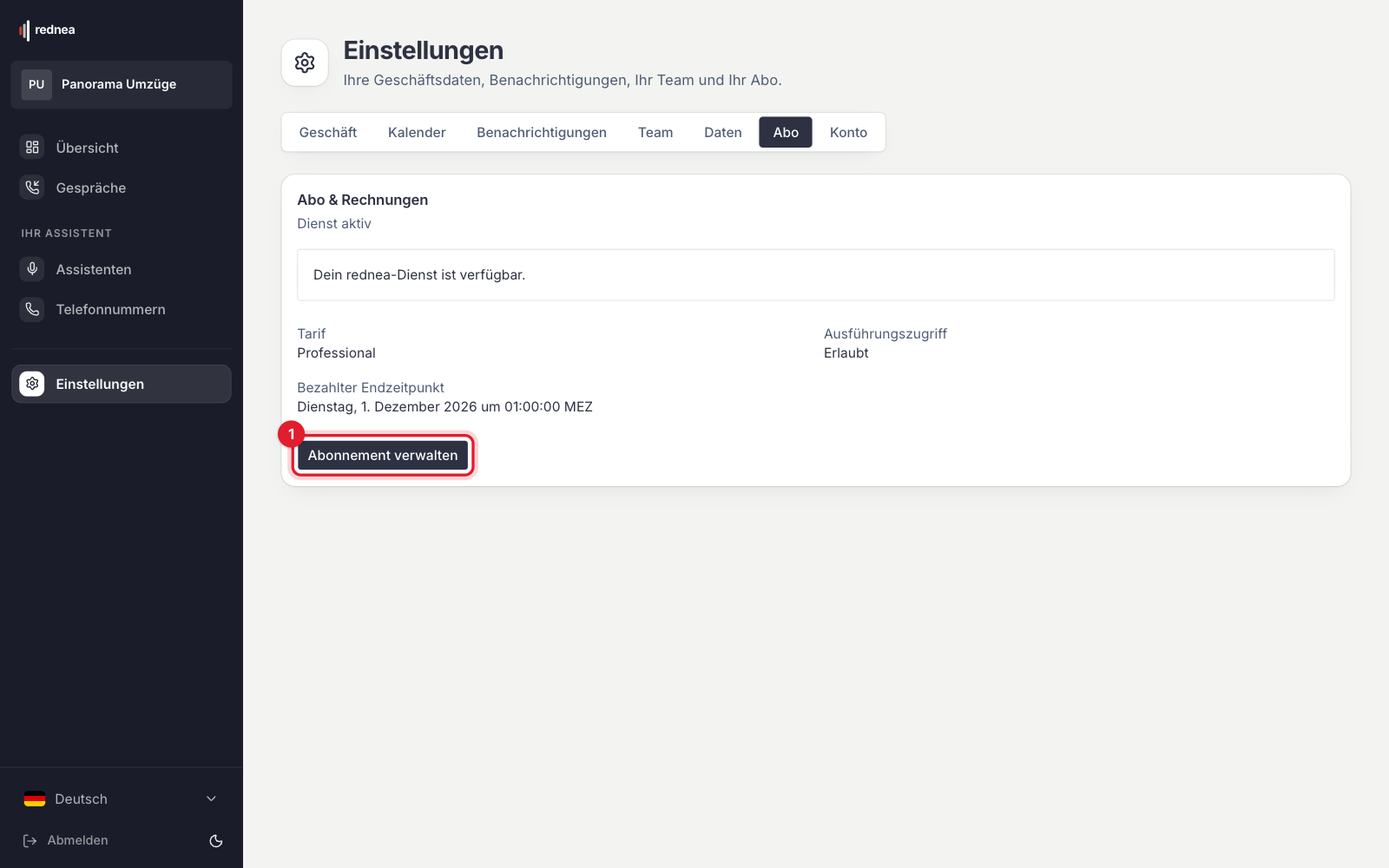
- At the top of the page, click the Subscription tab. The Subscription & billing card shows your status.
- At the bottom of the card, click Manage subscription («Abonnement verwalten», red number 1). This opens the secure Stripe customer portal.
- Choose to cancel your subscription there and confirm.
In the same portal you can also update your payment method (for example a new credit card), change your billing details, and view and download invoices. You do not change your plan in the portal: write to info@rednea.ch for that.
Note: only Owners and Admins can manage billing. With the Viewer role, the card shows the note "Only Owners and Admins can manage billing." Then ask an Owner or Admin to cancel. If Owners and Admins do not see the Manage subscription button either, your billing is not linked yet. Then write to info@rednea.ch. See also Invoices, payment and subscription status.
After you cancel, in the dashboard
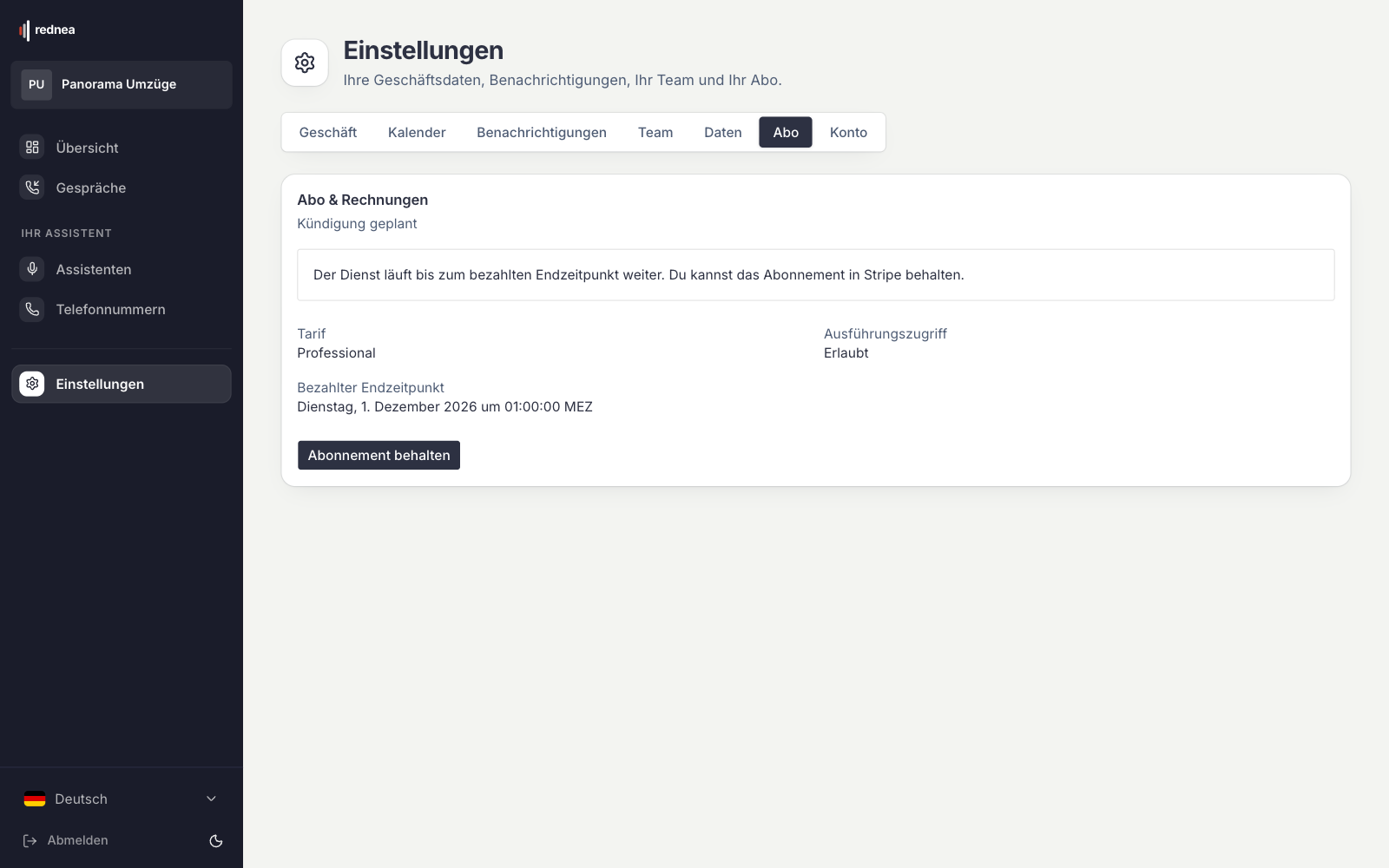
- Status: the Subscription & billing card now shows Cancellation scheduled. Below it you see the Paid-Through Time. The service continues until then.
- Reminder by email: at most 48 hours before that time, you get an email with the end date. It goes to the email address stored with Stripe.
- Undo the cancellation: under Settings → Subscription, click Keep subscription. In the Stripe customer portal, you remove the cancellation. The Keep my subscription button in the reminder email leads to the same place.
Cancel by email
Write to info@rednea.ch, ideally from the email address you sign in with. Name your business and the date you want to end on. We confirm the cancellation in writing.
Notice and term
- No minimum term. The contract runs indefinitely and can be cancelled monthly.
- Any time, to the end of the month. You cancel whenever you like; the subscription ends at the end of the month.
- Access until the end: your assistant keeps answering calls until the end of the paid period.
- Amounts already paid are not paid back, not even pro rata.
The full conditions are in the Terms.
Before the last day: remove call forwarding
If you forwarded your existing number to rednea, switch the forwarding off with your phone provider before the subscription ends. Otherwise calls land on a number that no longer answers. How the forwarding is set up is described in Connect your existing number.
What happens to your data
After the contract ends we delete your data within 30 days, unless a legal retention duty applies. If you want to keep call lists, summaries or recordings, ask for an export first: an email to info@rednea.ch is enough.
Adjust instead of cancelling?
Often it comes down to one detail that is quick to fix: a greeting that does not fit, too many or too few minutes, Swiss German instead of Standard German. Write to us before you cancel. You can change plans at any time: write to info@rednea.ch. You find the plans in Pricing & minutes.
Frequently asked questions
Is there a minimum term?
No. rednea is cancelled monthly, with no minimum term and no annual commitment.
When can I cancel?
At any time, to the end of the month.
Can I cancel by email?
Yes. An email to info@rednea.ch is enough.
Does my assistant still work after I cancel?
Yes, until the end of the paid period.
Can I undo my cancellation?
Yes, until the Paid-Through Time. Under Settings → Subscription, click Keep subscription.
Can I start again later?
Yes. You can take out a new subscription at any time. As your data is deleted after the contract ends, you set the assistant up again.
Related articles
Still have questions?
Write to us — we're happy to help. Or listen to a live demo right in your browser.