When does the assistant answer? Always, as a backup or only on some days
Last updated 20 November 2026
Some want the assistant to take every call. Others want it only as a backup when the reception is busy. Others again want it only on some days. All of this is possible. You control it with the call forwarding of your existing number.
In short: Each call that arrives on your rednea number goes to your assistant. When a call arrives there is set at your phone provider or in your phone system: forward all calls (the assistant always answers), forward when there is no answer and when busy (the assistant is the backup), or switch the forwarding on and off on some days. In rednea itself, you do not set days or times for taking calls. Only the transfer to a person can be limited to set times in rednea.
The three options at a glance
| Option | Call forwarding | Does your phone ring first? |
|---|---|---|
| Assistant always answers | all calls: *21*NUMBER# | No |
| Assistant as a backup | when there is no answer, optionally also when busy | Yes |
| Only on some days | switch the forwarding on and off at these times | depends on the day |
Always replace NUMBER with your rednea number. You find it in the dashboard, in the left column under Phone Numbers.
Option 1: The assistant always answers
On your phone, dial *21*NUMBER# and press the call key. From now on, each call goes to your assistant at once. Your own phone does not ring. With #21# you switch this forwarding off again.
This suits, for example, a business without a fixed person on the phone, the time outside the opening hours, or holidays. This option is not available on Sunrise Prepaid.
Option 2: The assistant as a backup
Your phone rings first. The assistant takes over only when nobody answers or when the line is busy.
- When there is no answer: With Swisscom, the code is for example
*61*NUMBER*11*20#. The 20 is the delay in seconds: how long your phone rings before the assistant takes over. With Swisscom and Salt you can choose 10, 15, 20, 25 or 30. - When busy: With Swisscom and Sunrise
*67*NUMBER#, with Salt*69*NUMBER#. With this, the assistant takes over when your reception is on another call.
You find the exact codes for your provider in the guides for Swisscom, Sunrise and Salt. On the Sunrise landline, call waiting and call forwarding cannot be active at the same time. The details are in the Sunrise guide.
Good to know: outside your attendance hours, nobody answers. With forwarding when there is no answer, the assistant then takes over automatically, and you do not have to switch anything. Callers first hear only a few rings. This needs your phone to be switched on and to ring. This suits, for example, a GP practice that needs the assistant early in the morning, over lunch and in the evening.
Option 3: Only on some days or at some times
If your assistant must answer directly on some days and be only the backup on others, switch the forwarding of all calls on and off on these days. An example for a practice whose reception is not staffed on Monday and Tuesday:
| Days | Setting | How to switch |
|---|---|---|
| Monday and Tuesday | all calls go directly to the assistant | dial *21*NUMBER# in the morning |
| Wednesday to Friday | the reception answers, the assistant is the backup | dial #21# on Wednesday morning |
After each switch, check with a call from a different phone that it rings the way you want. If the forwarding when there is no answer or when busy no longer works afterwards, set it up again with the code of your provider.
You can also set up forwarding when there is no answer online instead of with a code: with Swisscom at my.swisscom.ch or cockpit.swisscom.ch, with Sunrise at my.sunrise.ch and with Salt at my.salt.ch. The steps are in the guide for your provider.
If you have a phone system, for example in a practice with more than one phone, you usually set up the forwarding there. Ask your provider, or the company that looks after your system, if the forwarding can switch automatically by weekday or time.
Also possible: the assistant behaves differently by day
Your assistant can do something different depending on the day or the time, for example only take a message on some days. For this, put the weekday and the time in its instructions:
- In the left column, click Assistants and then your assistant.
- In the row of tabs, click Instructions.
- Below the field Instructions for your assistant, next to Insert a detail, click Day of the week and Current time.
- Write the rule with them.
- Test the rule in the Test Call panel at the top of the page with Test draft. Callers hear the new rule only after you click Save & go live.
For example:
"Today is {{day_of_week}}, the time is {{current_time}}. On Monday and Tuesday, answer questions and take down appointment requests. On the other days, take down only the name, callback number and request, and say that the team will call back."
The weekday and the time apply in the Timezone that you set under Settings → Business tab, in the Opening hours card. Your assistant writes the weekday in its language, so for a German-speaking assistant for example «Montag».
Do not mix it up: transfer to a person
The call forwarding sets when a call comes to rednea. If your assistant must hand a call to you or your team during the call, read Transfer calls to a person.
You can limit this transfer to set times in rednea, for example only during your attendance hours:
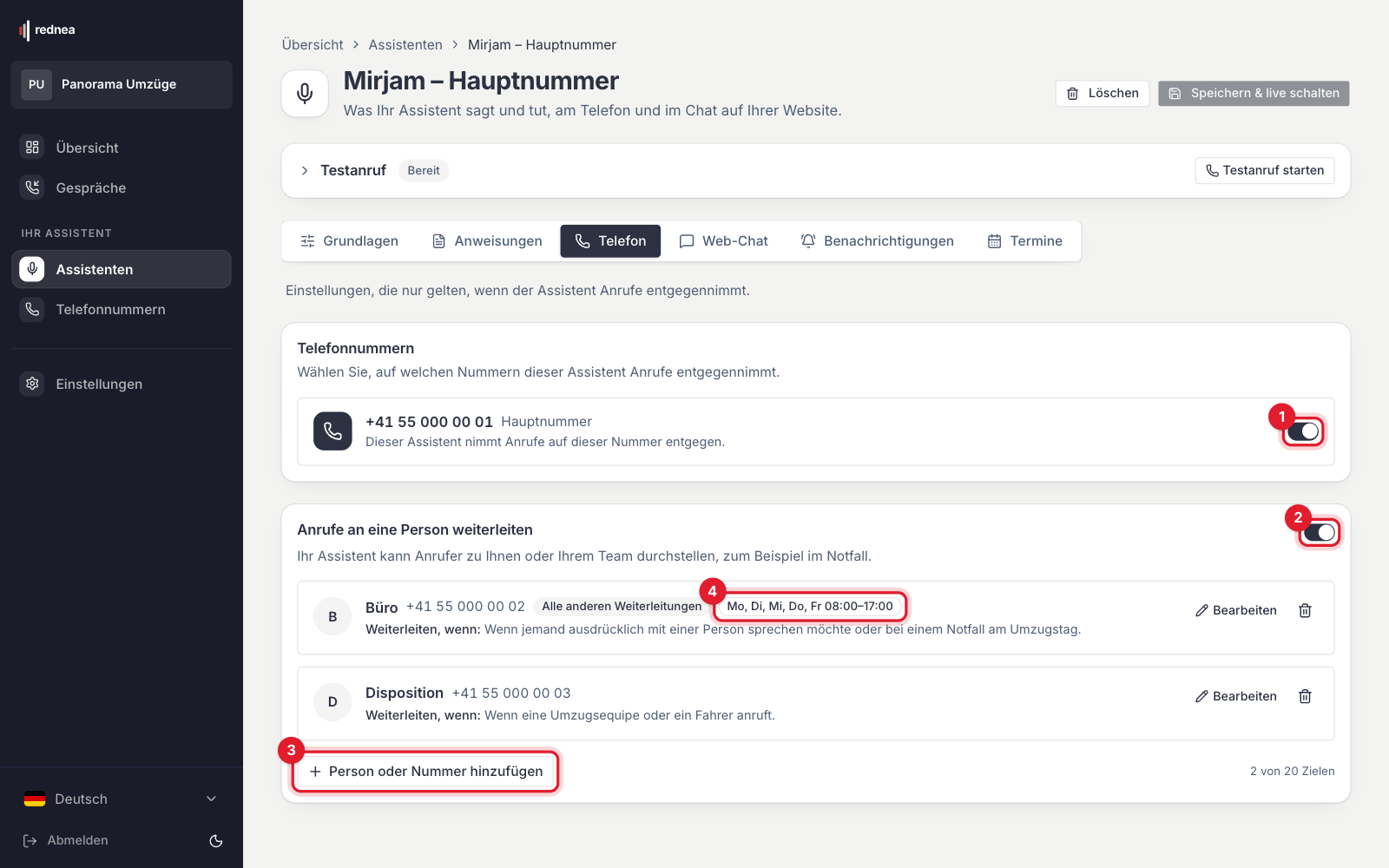
- In the left column, click Assistants, then your assistant, and in the row of tabs click Phone. The Transfer calls to a person switch must be on (see 2 in the first image).
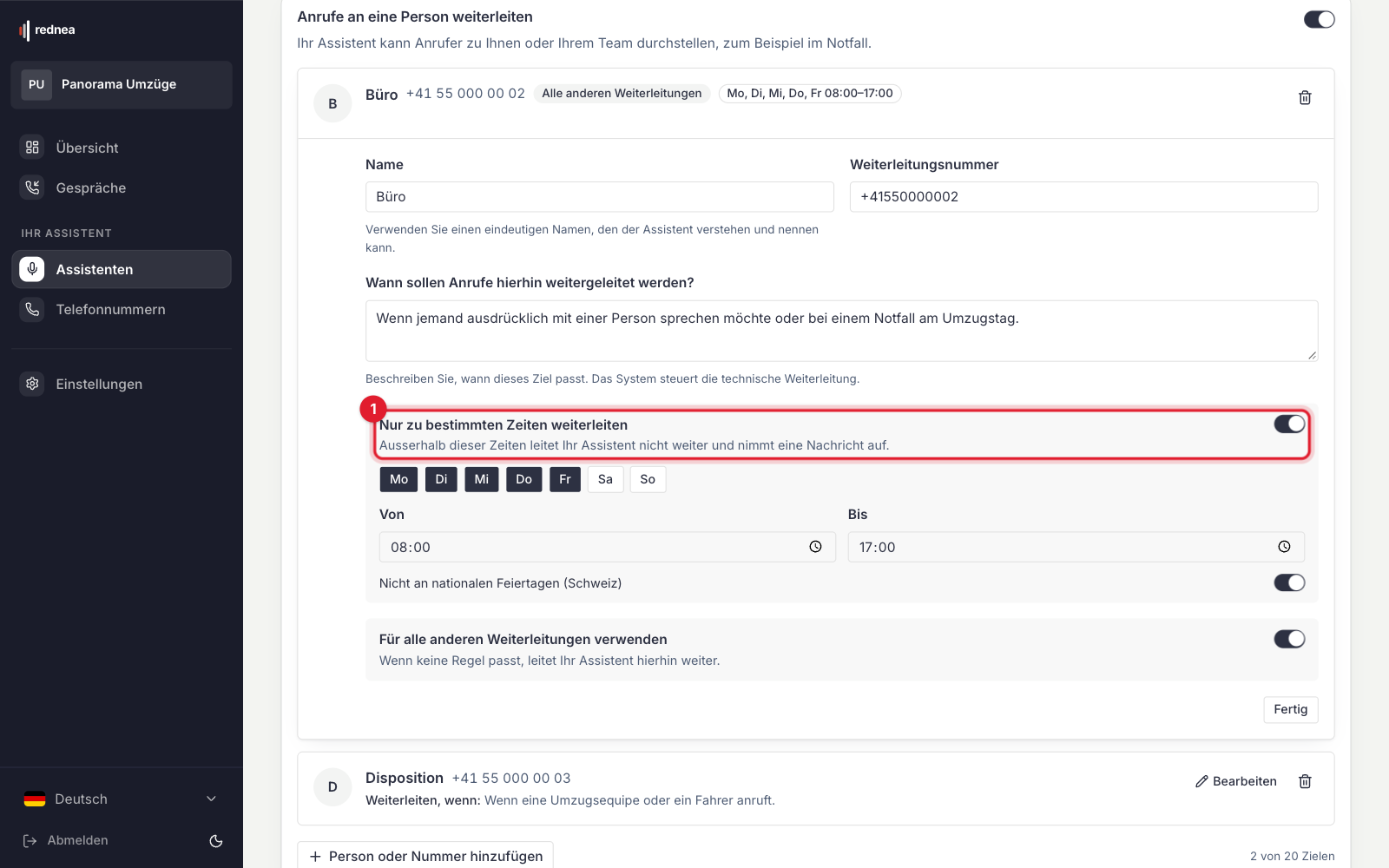
- On the transfer target, click Edit and switch on Forward only at set times (see 1 in the second image).
- Choose the Weekdays and the times under From and Until. With Not on national public holidays (Switzerland), the assistant does not transfer on these holidays.
- Click Done and then Save & go live at the top right.
The target then shows its times, for example «Mo, Di, Mi, Do, Fr 08:00–17:00» (see 4 in the first image). Outside these times, your assistant does not transfer and takes a message.
!The target «Büro» (office) being edited, German screen. Marked in red is the switch «Nur zu bestimmten Zeiten weiterleiten» (Forward only at set times, 1). Below it the weekdays Mon to Fri, «Von» (From) 08:00, «Bis» (Until) 17:00, the switch «Nicht an nationalen Feiertagen (Schweiz)» (Not on national public holidays (Switzerland)) and the «Fertig» (Done) button. The times apply in the Timezone from the Business tab.
For this, we recommend a direct number as the target, for example a mobile number or an extension. If the target is your main number and it is forwarded to rednea, the call can land with your assistant again.
What this means for your minutes
Each call that the call forwarding brings to your assistant is a call on your rednea number and counts toward your minutes. When your assistant transfers a call, the transferred time also counts. Calls that you answer yourself do not come to rednea and do not count.
When your minutes, including the reserve, are used up, your assistant takes no new calls until the next month. If you forward all calls, nobody then reaches your team. How you are warned by email before this is in Pricing & minutes.
At your phone provider, switching on the forwarding is free. You pay for the forwarded call at your normal rate.
Frequently asked questions
Can I set times in rednea at which the assistant answers?
No. Your assistant takes each call that arrives on your rednea number. When a call arrives there is set by the call forwarding. In rednea you can only set at which times your assistant transfers to a person, see above.
How do I check that everything is set correctly?
Call your existing number from a different phone. Then you see the call in the dashboard under Conversations. How a call with the assistant goes is shown in How the assistant answers calls. A tour of the dashboard is in Getting started (with video).
How do I switch off all forwardings at once?
With ##002#. After that, only your own phone rings again.
Do callers notice which option is active?
No. They call the same number as always. The caller's number stays visible, also for your assistant.
I am not sure which option suits me. Whom can I ask?
Write to info@rednea.ch and tell us when your phone is staffed and when it is not.
Related articles
Still have questions?
Write to us — we're happy to help. Or listen to a live demo right in your browser.