Try rednea before you start: your personal demo
Last updated 20 November 2026
Many people ask before they start: "Can we try it first?" Yes, with a personal demo built on your own business. There is no trial period on a subscription, and you do not need one.
In short: rednea has no trial period. Instead, you build a personal demo on the demo page: you enter your business email, rednea reads your website and builds an assistant from it that you talk to right in the browser. If you start afterwards, the subscription is cancelled monthly, with no minimum term.
Build your personal demo
- Open the demo page.
- Enter your business email address.
- rednea reads your website and builds an assistant for your business from it.
- Start the demo in the browser and talk to the assistant the way your customers would on the phone.
All you need is a microphone.
What to check in the demo
- Language: Does the assistant understand your dialect? Does it answer the way you want, in Swiss German or in Standard German?
- Your typical call: Play through two or three requests that come up every day.
- Hard cases: Ask something the assistant cannot know. It should say plainly that it will check, not guess.
- Names and numbers: Spell a name and give a phone number.
The demo only knows what is on your website. Opening hours, prices or internal processes that are missing there are added later in your own assistant.
Want to see your exact process?
If your case needs more than the website provides, for example a specific booking logic, several locations or a connection to your software, write to info@rednea.ch. We set up a demo for your process and show it to you.
Keep testing after you start
With a subscription you still test in peace before real calls arrive:
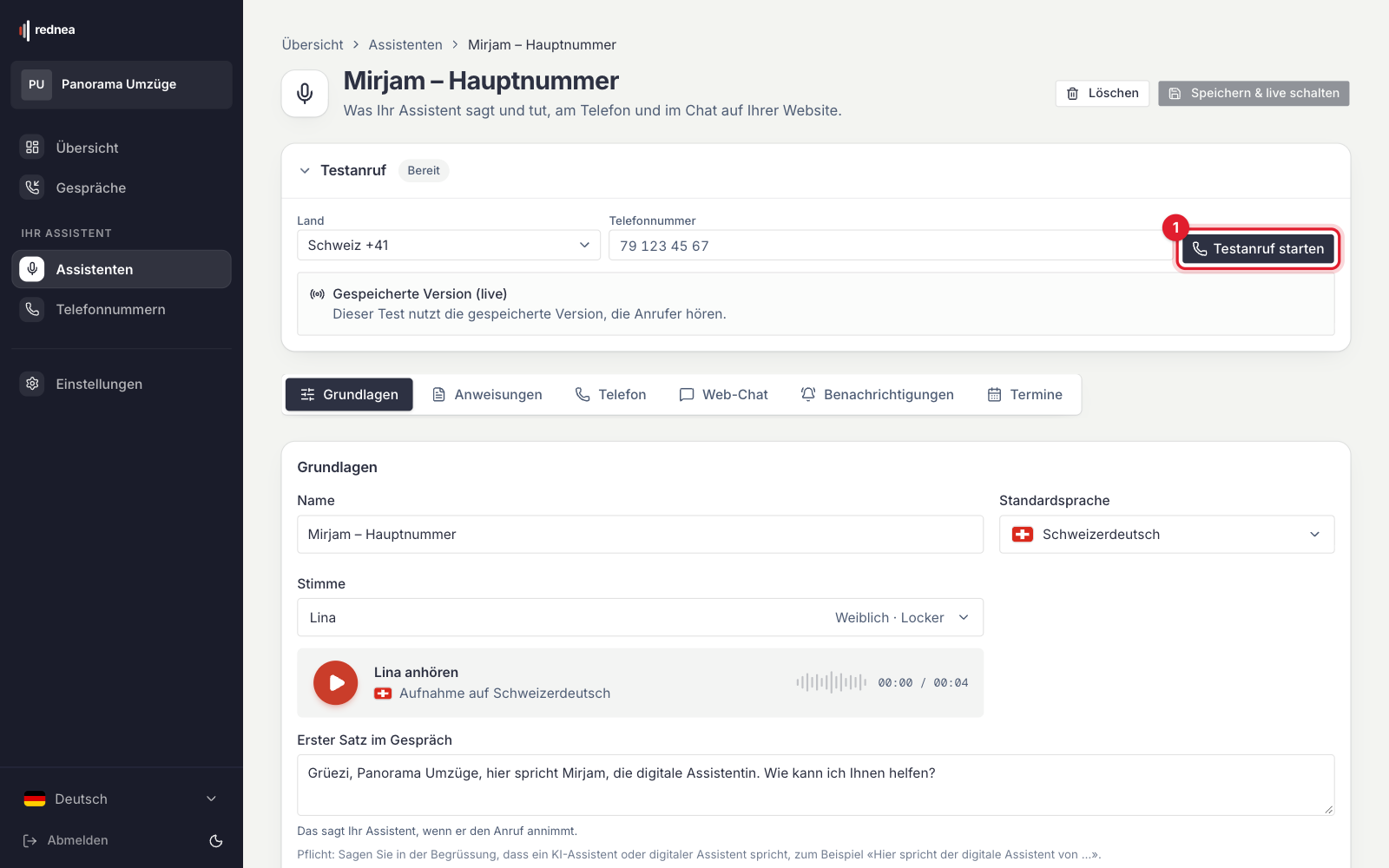
- Test calls in the dashboard do not count towards your minutes. Click Assistants in the left column, then your assistant, and in the Test Call panel at the top click Start test call («Testanruf starten», see 1 in the first image). Under Country and Phone number is the number your assistant sees as the caller's number during the test.
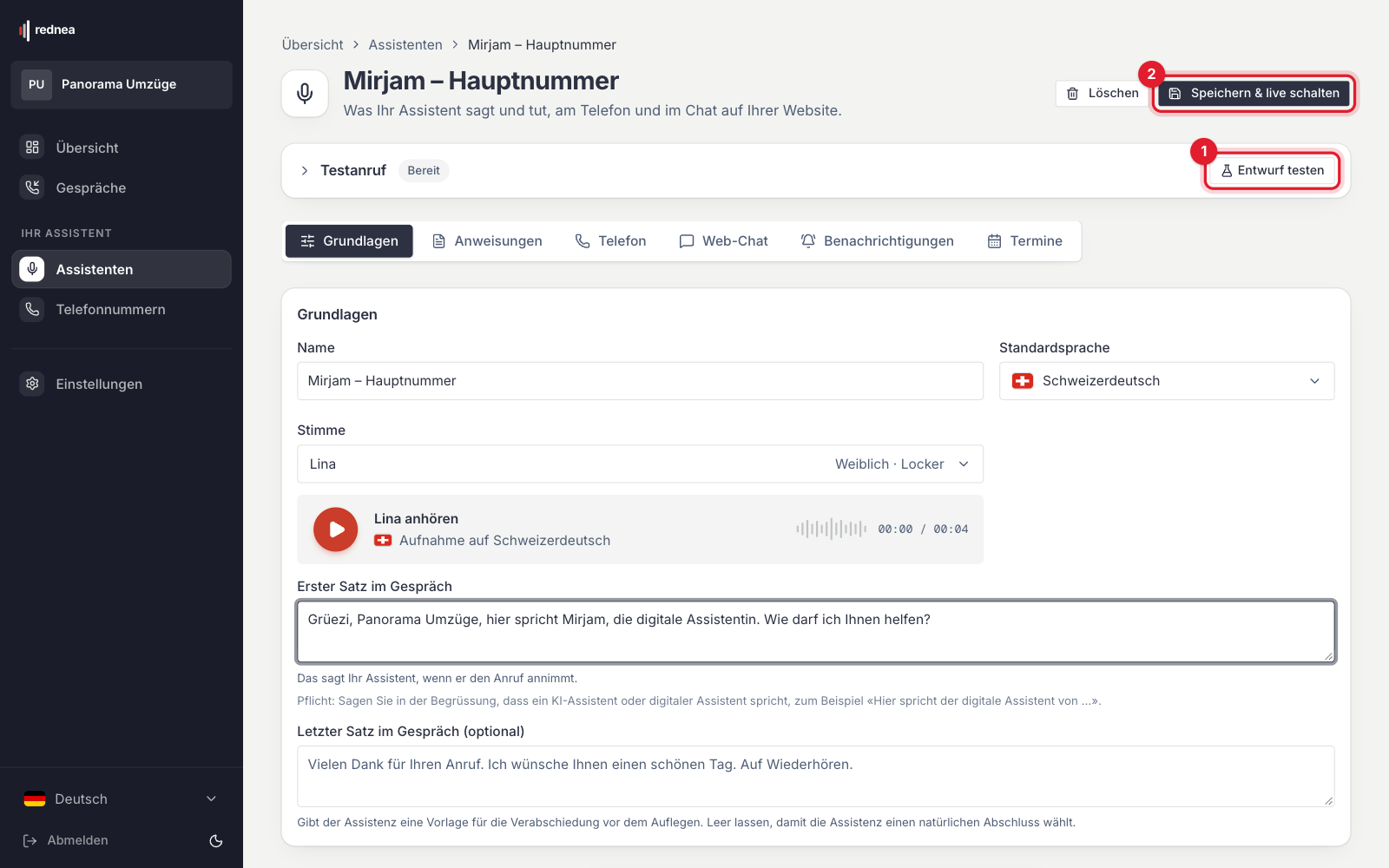
- Test changes as a draft first. When you have changed something and not saved it yet, the button reads Test draft. The test uses your changes; callers still hear the saved version. Only Save & go live puts the change live for real calls (see 1 and 2 in the second image). The tour of the dashboard is in Getting started (with video), a map of all areas in The dashboard at a glance.
- You only forward your number once you are happy. Until then your phone works as before.
- Many start by forwarding only when the line is busy or nobody answers, see Connect your existing number. Which option suits you is in When does the assistant answer?.
Why there is no trial period
rednea is cancelled monthly, with no minimum term and no setup fee. So you take no long-term risk. The demo shows you before you sign up how the assistant sounds for your business. How to cancel is described in Cancel your subscription.
Frequently asked questions
Is there a trial period?
No. You test in advance with your personal demo and then start with a subscription you can cancel monthly.
Can I share the demo with colleagues?
Yes. The demo has its own link that you can pass on.
Do test calls count towards my minutes?
No. Test calls in the dashboard and demo calls do not count.
Do callers hear my changes while I test them?
No. Test draft uses your unsaved changes only in the test. Callers hear the new version only after you click Save & go live.
Can I begin with a small plan?
Yes. You can start on the Basic plan and change at any time, see Pricing & minutes.
Related articles
Still have questions?
Write to us — we're happy to help. Or listen to a live demo right in your browser.