Set the language of your assistant (Standard German, Swiss German, French …)
Last updated 20 November 2026
Each assistant has a Default Language. The assistant speaks this language as long as the caller does not show that they want a different one. The setting applies per assistant, not to the whole business.
In short: In the left column, open Assistants, then your assistant. In the Basics tab, choose in the Default Language field the language that most of your callers speak. With Deutsch, the assistant speaks Standard German; with Schweizerdeutsch, it speaks Swiss German dialect. When a caller clearly speaks a different language, the assistant follows. When the language is not clear, it stays with the default language. Test with Test draft and go live with Save & go live.
How to set the language
- In the dashboard, click Assistants in the left column and then your assistant.
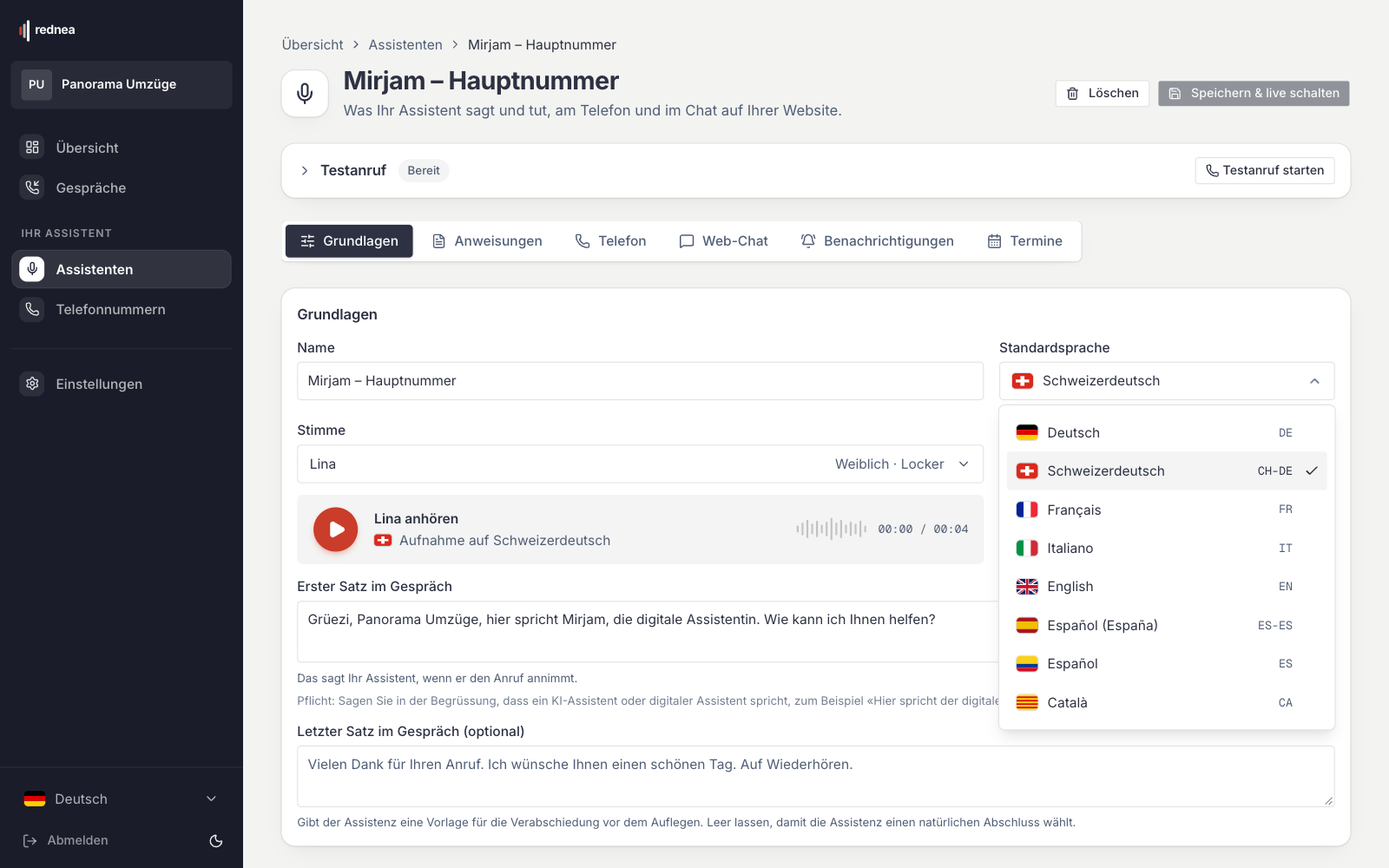
- Below the Test Call panel, the Basics tab is open. In the Basics card, the Default Language field is next to the name.
- Click the field and choose a language (first image below). In the list, each language is written in its own language: Deutsch (Standard German), Schweizerdeutsch (Swiss German), Français, Italiano, English, Español (España), Español and Català.
- Check the First sentence of the call field further down (see below).
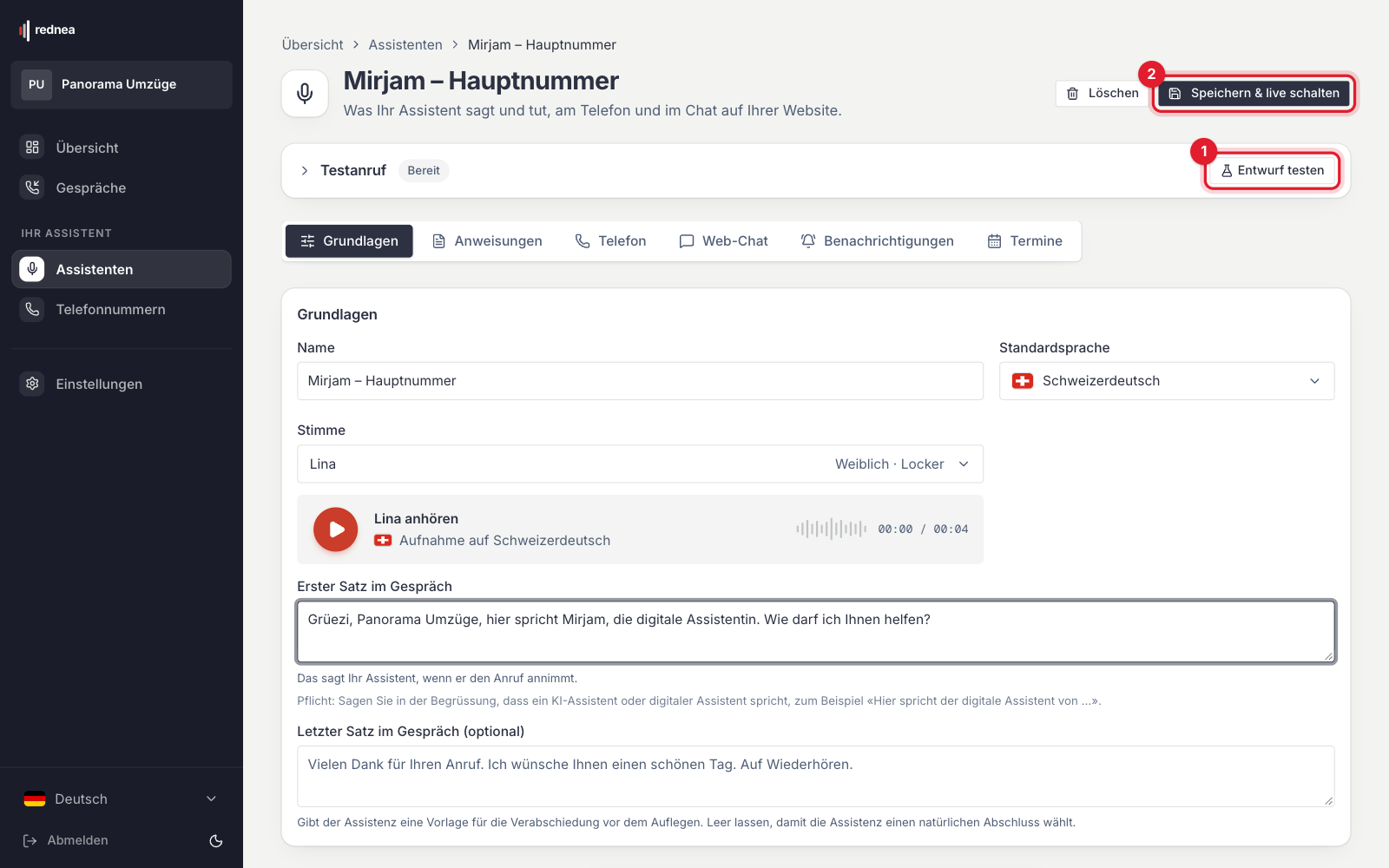
- Test the new language: at the top of the page, the button in the Test Call panel is now called Test draft (red number 1 in the second image). The test call uses your unsaved change. Callers still hear the saved version.
- When everything is correct, click Save & go live at the top right (red number 2). From then on, the new language applies to all calls.
You choose the voice in the Voice field below. Each voice works in each language. More in Choosing the right voice.
Deutsch or Schweizerdeutsch?
- Deutsch: The assistant starts in Standard German. When the caller clearly speaks Swiss German or a different language, or asks for it, the assistant changes too and stays in this language for the rest of the call.
- Schweizerdeutsch: The assistant speaks Swiss German dialect for the whole call, in a form that is widely understood, and always formally («Sie»). It changes to Standard German only when the caller asks for it or speaks Standard German themselves. More in Does the assistant understand Swiss German?.
"Speak Standard German, understand dialect": Choose Deutsch. The assistant starts in Standard German and is set up for callers who also speak dialect. Note: with this setting, the assistant follows a person who clearly speaks Swiss German. That person can then also get answers in dialect.
Always Standard German, also when callers speak dialect: This is possible. There is no separate switch for it; the assistant follows its instructions. Do this:
- Choose Deutsch as the default language.
- Open the Instructions tab and write a clear instruction, for example: «Sprechen Sie immer Hochdeutsch, auch wenn die anrufende Person Mundart spricht.» ("Always speak Standard German, also when the caller speaks dialect.")
- Check the result with Test draft and speak dialect in the test. Then click Save & go live.
This is also an instruction to the assistant, not a guarantee. If you want us to set this up for you, write to info@rednea.ch.
When someone speaks a different language
The assistant has the instruction to follow the caller's language when the caller clearly speaks a different language. When the language is not clear, for example with a short "Hello", it stays with the default language. There is no button and no menu for the change: the caller simply speaks in their language or asks for a different one.
The change is an instruction to the assistant, not a guarantee. Test the languages that you often hear with a test call: in the test call, simply speak the other language. Not a customer yet? Then try it with a personal demo, see Try rednea before you start.
Which default language is right?
Choose the language that most of your callers speak. An example: a practice in Geneva with mostly French-speaking customers chooses Français. When someone calls in English, the assistant continues in English. With English as the default language, the assistant would instead continue in English until a person clearly speaks a different language.
If you have more than one phone number with rednea, for example one for each language, you can give each number its own assistant with its own default language. You choose the number in the Phone tab of the assistant.
The first sentence
The assistant says the First sentence of the call exactly as you write it. So write it in the default language. If the default language does not match the first sentence, the call starts in the wrong language.
If you want, the first sentence can say briefly that other languages are possible, for example: «Grüezi. Praxis Muster, wie kann ich Ihnen helfen? Gerne auch auf Französisch oder Englisch.» ("Hello. Muster practice, how can I help you? French or English are also fine.")
For instructions such as "Always ask for the date of birth", use the Instructions tab. See Setting up instructions for your assistant.
Language of the email summary
The summary after the call has its own language setting:
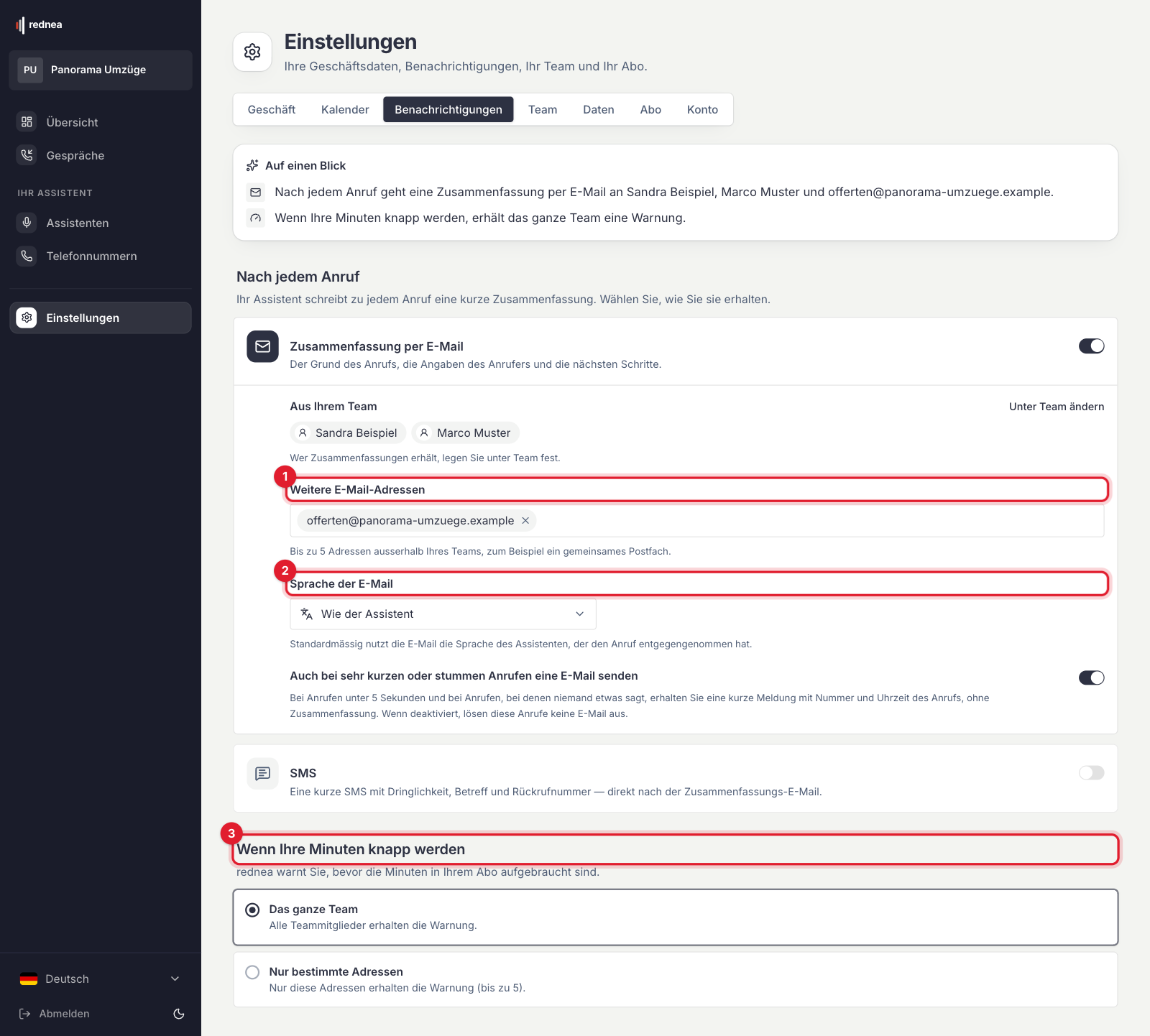
- In the left column, click Settings and at the top the Notifications tab.
- In the Email summary section, you find the Language of the email field (red number 2).
- With Same as the assistant, the email comes in the default language of the assistant that took the call. For an assistant in Swiss German, it comes in Standard German. You can also choose a fixed language.
- Click Save notification settings at the bottom.
This setting applies to all assistants of your business.
Frequently asked questions
Must I choose French or English as the default?
Choose the language of most of your callers. When someone clearly speaks a different language, the assistant follows.
Does the assistant understand dialect when I choose «Deutsch»?
The assistant is set up for callers who also speak Swiss German. When someone clearly speaks dialect, it can also answer in dialect. Check this with a test call in your dialect.
Can the assistant always speak Standard German, also with dialect?
Yes, with a clear instruction in the Instructions tab, for example: «Sprechen Sie immer Hochdeutsch, auch wenn die anrufende Person Mundart spricht.» Check this with a test call. We set it up for you on request: info@rednea.ch.
Does the assistant change the language by itself?
Yes, when the caller clearly speaks a different language or asks for it. When the language is not clear, it stays with the default language.
Can I set a different language for each phone number?
Yes, if you have more than one number: with a separate assistant per number. The default language applies per assistant.
In which language does the summary come?
By default in the language of the assistant; for Swiss German, in Standard German. Under Settings → Notifications → Language of the email you choose a different one.
I do not see the "Assistants" area. Why?
Your access has the Viewer role. Only people with the Owner or Admin role change the language. More in Invite your team, set roles and listen to calls.
Related articles
Still have questions?
Write to us — we're happy to help. Or listen to a live demo right in your browser.